

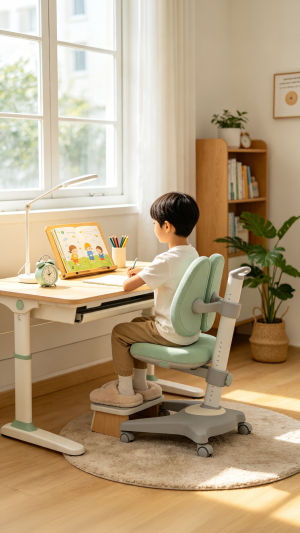
A well-designed study space can make reading, writing, and computer work more comfortable for children.
The right combination of furniture, screen placement, lighting, and workspace organization can reduce unnecessary strain while supporting natural movement throughout the day.
Ergonomics for children is not about maintaining a rigid posture. It is about creating a workspace that fits the child and can be adjusted as they grow.
<h3>Choose the Right Chair</h3>
A supportive chair should allow the child's back to rest comfortably against the backrest while keeping the feet firmly supported.
“A child's spine, including the neck, should be straight and in a neutral position.” — Gary Kirkilas, DO, FAAP, American Academy of Pediatrics.
The feet should ideally rest flat on the floor. If the chair needs to be raised because of the desk height, a stable footrest can provide additional support. The knees should remain comfortably positioned without being pushed upward or left unsupported.
For growing children, adjustable seating can be particularly practical because the height can be modified as their needs change.
<h3>Set the Desk at a Comfortable Height</h3>
The desk should allow the child to work without repeatedly lifting the shoulders or bending far forward.
During writing or other tabletop activities, the forearms should be able to rest comfortably on or near the work surface. Books, notebooks, and frequently used supplies should also be within easy reach.
A height-adjustable desk can be useful for a child who is still growing, allowing the workspace to be modified over time.
<h3>Position the Screen Correctly</h3>
For children who use computers, screen placement deserves particular attention.
The screen should generally sit at or slightly below eye level and at a comfortable viewing distance. A screen that is too high may encourage the child to raise the head, while one that is too low or far away may encourage leaning forward.
With a laptop, raising the screen can improve the viewing position. An external keyboard and mouse can then help maintain a comfortable position for the arms and wrists.
<h3>Improve Lighting and Reduce Glare</h3>
Appropriate lighting can make reading and screen-based activities more comfortable.
Place the desk where direct light does not create strong reflections on the screen. The room should be bright enough for reading and writing without producing distracting glare.
Screen brightness should also be adjusted to suit the surrounding room rather than appearing noticeably brighter or darker than the environment.
<h3>Give the Eyes Regular Breaks</h3>
Extended close-up screen use can contribute to tired or irritated eyes, blurred vision, and headaches.
A simple approach is the 20-20-20 method: approximately every 20 minutes, look at something about 20 feet away for 20 seconds. Children should also blink regularly and take longer breaks from close-up activities during the day.
<h3>Build Movement Into the Routine</h3>
Children should not be expected to remain at their desks continuously.
Breaks can include walking, playing, changing activities, or simply standing up for a while. Alternating periods of focused work with movement can make longer study sessions more comfortable and practical.
<h3>Understand Scoliosis</h3>
Poor sitting posture does not cause scoliosis.
Scoliosis is a sideways curvature of the spine, and many cases do not have a clearly identified cause. A properly arranged workstation can support comfortable positioning, but it should not be described as a way to prevent scoliosis.
Parents should seek professional evaluation if they notice persistent asymmetry, such as uneven shoulders or hips, a shoulder blade that appears more prominent on one side, or a child who consistently leans to one side.
<h3>Know When Back Pain Needs Attention</h3>
Back pain in children should not automatically be attributed to their desk setup.
Professional medical advice is appropriate when pain persists, repeatedly returns, or interferes with school, sleep, physical activity, or everyday routines. Evaluation is also important when pain occurs alongside symptoms such as fever, weakness, numbness, difficulty walking, or changes in bladder or bowel control.
<h3>Quick Ergonomic Checklist</h3>
A child-friendly study area should have:
- A supportive chair
- Feet supported by the floor or a stable footrest
- A desk at a suitable height
- A screen at or slightly below eye level
- A comfortable viewing distance
- Minimal glare
- Suitable room lighting
- Frequently used materials within easy reach
- Regular visual breaks
- Opportunities to stand and move
<h3>Create a Workspace That Grows With Your Child</h3>
The best ergonomic desk setup is one that adapts as a child grows and their study needs change. Rather than aiming for perfect posture, focus on a workspace that provides appropriate support, comfortable screen positioning, suitable lighting, and enough freedom to move.
Small adjustments can make a meaningful difference to everyday study comfort. Reassessing the setup as the child grows or whenever persistent discomfort appears helps keep the workspace practical, comfortable, and suited to their changing needs.